Thursday, 23 April 2020

What is Agile,advantage and disadvantages


Introduction:-
It is a software development life cycle used for software development, that is characterized by the division of tasks into short phases of work and frequent reassessment and adaptation of plans.


Agile Work Flow:-


THE AGILE ITERATION WORKFLOW: -


  • Requirements - Define the requirements for the iteration based on the product backlog, sprint backlog, customer and stakeholder feedback.
  • Development - Design and develop software based on defined requirements.
  • Testing - QA (Quality Assurance) testing, internal and external training, documentation development.
  • Delivery - Integrate and deliver the working iteration into production.
  • Feedback - Accept customer and stakeholder feedback and work it into the requirements of the next iteration
MAKING THE AGILE PROCESS WORK FOR YOU:-
  • Daily Meetings - Host consistent or daily stand-up meetings to maintain open communication, hold workers accountable, and keep each iteration moving forwar
  • Live Demonstrations - Deliver live demonstrations of each iteration’s final product to show progress.
  • Share Feedback - Receive feedback from stakeholders and customers and share it with the entire team before the next iteration begin.
  • Remain Agile - Make changes to your process based on feedback to ensure each iteration improves the last.
Agile Manifesto:-
  •   Individuals and interactions over processes and tools
  • Working software over comprehensive documentation
  • Customer collaboration over contract negotiation
  • Responding to change over following a plan

Principles behind the Agile Manifesto: -
  1. Our highest priority is to satisfy the customer through early and continuous delivery of valuable software.
  2. Welcome changing requirements, even late in development. Agile processes harness change for the customer's competitive advantage.
  3. Deliver working software frequently, from a couple of weeks to a couple of months, with a preference to the shorter timescale.
  4. Business people and developers must work together daily throughout the project.
  5. Build projects around motivated individuals. Give them the environment and support they need, and trust them to get the job done
  6. The most efficient and effective method of conveying information to and within a development team is face-to-face conversation
  7. Working software is the primary measure of progress.
  8. Agile processes promote sustainable development. The sponsors, developers, and users should be able to maintain a constant pace indefinitely.
  9. Continuous attention to technical excellence and good design enhances agility.
  10. Simplicity--the art of maximizing the amount of work not done--is essential.
  11. The best architectures, requirements, and designs emerge from self-organizing teams
  12. At regular intervals, the team reflects on how to become more affective, then tunes and adjusts its behavior accordingly

ADVANTAGES: -
·         Corrections of functional requirements are implemented into the development process to provide the competitiveness
·         Project is divided by short and transparent iterations
·         Risks are minimized thanks to the flexible change process
·         Fast release of the first product version
DISADVANTAGES: -
·         Difficulties with measuring the final cost because of permanent changes
·         The team should be highly professional and client-oriented
·         New requirements may conflict with the existing architecture
·         With all the corrections and changes there is possibility that the project will exceed expected time


Tuesday, 21 April 2020

Optimization in MVC


  1. Optimization is the technique that is used to reduce the size of CSS and Script in bundleConfig.cs
  2. It make bundle compact and smaller in size.
  3. optimization work in release mode by default it is disable in debug mode.


Syntax Of optimization:-  this syntax is used in the global.asax. we can enable or disable the optimization with the help to set as true or false.

  public class MvcApplication : System.Web.HttpApplication
    {
        protected void Application_Start()
        {
            System.Web.Optimization.BundleTable.EnableOptimizations = false;
        }
    }

Monday, 20 April 2020

How to download SSRS report in Excel in Core asp.net with Angularjs


This the demo how to download the ssrs report in Core asp.net.


Export.cshtml:- in this page copy in page the code

@{
    ViewData["Title"] = "Export";
}

<h1>Export</h1>
<script src="https://ajax.googleapis.com/ajax/libs/angularjs/1.6.9/angular.min.js"></script>
<script>
    var app = angular.module('DemoApp', []);
    app.controller('DemoController'function ($scope, $window) {
        $scope.export = function () {
            var path = "https://localhost:44342/Home/ExportReport?id=1";
            $window.location.href = path
        }
    });
</script>
<div ng-app="DemoApp" ng-controller="DemoController">
    <a style="cursor:pointer;color:blue" ng-click="export()">Export Report</a>
</div>


Controller Page:-

ServerName :- change the name with your server name where you put your Report.
ProjectName:- Change the name with your project name.
ReportName:- change with your report name that you give.

        public IActionResult Export()
        {
            return View();
        }

        public ActionResult ExportReport(string id)
        {
          string reportserver = "http://ServerName";
string url = string.Format("{0}/ReportServer/Pages/ReportViewer.aspx?/ProjectName/ReportName&rs:Command=Render&rs:Format=EXCELOPENXML&rc: id={1}", reportserver,  id);
           return Redirect(url);
        }


Thursday, 5 December 2019

Failed to load resource: the server responded with a status of 404 (File not found) for image

If the image not find set the default image.

Use this:-
onerror="this.onerror=null; this.src='../images/Default.png'"

Example:-

 <img  src="images.png" alt="User Image" onerror="this.onerror=null; this.src='Default.png'" >

Monday, 30 September 2019

Error Logger in .net Core

To configuring Elmah follow the following steps in the Code:

1. Start the NuGet Solution .
2. Download the 2 package ElmahcoreElmahCore.Sql
    as shown in the image


3. Open the Startup.cs Page
    Add using ElmahCore;
           using ElmahCore.Sql;
    directives in the top of the page.

4. In the ConfigureServices method add the following code.
    
            services.AddElmah<SqlErrorLog>(options =>
            {
                options.ConnectionString = AppSetting.ConnectionString;
            });

5. In the Configure method, add the following code:

app.UseElmah();


In the SQL Execute the following Query:-

1. Create a table to capture the Error

/****** Object: Table [dbo].[ELMAH_Error] Script Date: 9/5/2019 2:49:51 PM ******/ SET ANSI_NULLS ON GO SET QUOTED_IDENTIFIER ON GO CREATE TABLE [dbo].[ELMAH_Error]( [ErrorId] [uniqueidentifier] NOT NULL, [Application] [nvarchar](60) NOT NULL, [Host] [nvarchar](50) NOT NULL, [Type] [nvarchar](100) NOT NULL, [Source] [nvarchar](60) NOT NULL, [Message] [nvarchar](500) NOT NULL, [User] [nvarchar](50) NOT NULL, [StatusCode] [int] NOT NULL, [TimeUtc] [datetime] NOT NULL, [Sequence] [int] IDENTITY(1,1) NOT NULL, [AllXml] [ntext] NOT NULL, CONSTRAINT [PK_ELMAH_Error] PRIMARY KEY NONCLUSTERED ( [ErrorId] ASC )WITH (PAD_INDEX = OFF, STATISTICS_NORECOMPUTE = OFF, IGNORE_DUP_KEY = OFF, ALLOW_ROW_LOCKS = ON, ALLOW_PAGE_LOCKS = ON) ON [PRIMARY] ) ON [PRIMARY] TEXTIMAGE_ON [PRIMARY] GO ALTER TABLE [dbo].[ELMAH_Error] ADD CONSTRAINT [DF_ELMAH_Error_ErrorId] DEFAULT (newid()) FOR [ErrorId] GO /****** Object: StoredProcedure [dbo].[ELMAH_GetErrorsXml] Script Date: 9/5/2019 2:49:53 PM ******/ SET ANSI_NULLS ON GO SET QUOTED_IDENTIFIER ON GO


2. Execute the blow Procedure

CREATE PROCEDURE [dbo].[ELMAH_GetErrorsXml] ( @Application NVARCHAR(60), @PageIndex INT = 0, @PageSize INT = 15, @TotalCount INT OUTPUT ) AS SET NOCOUNT ON DECLARE @FirstTimeUTC DATETIME DECLARE @FirstSequence INT DECLARE @StartRow INT DECLARE @StartRowIndex INT SELECT @TotalCount = COUNT(1) FROM [ELMAH_Error] WHERE [Application] = @Application -- Get the ID of the first error for the requested page SET @StartRowIndex = @PageIndex * @PageSize + 1 IF @StartRowIndex <= @TotalCount BEGIN SET ROWCOUNT @StartRowIndex SELECT @FirstTimeUTC = [TimeUtc], @FirstSequence = [Sequence] FROM [ELMAH_Error] WHERE [Application] = @Application ORDER BY [TimeUtc] DESC, [Sequence] DESC END ELSE BEGIN SET @PageSize = 0 END -- Now set the row count to the requested page size and get -- all records below it for the pertaining application. SET ROWCOUNT @PageSize SELECT errorId = [ErrorId], application = [Application], host = [Host], type = [Type], source = [Source], message = [Message], [user] = [User], statusCode = [StatusCode], time = CONVERT(VARCHAR(50), [TimeUtc], 126) + 'Z' FROM [ELMAH_Error] error WHERE [Application] = @Application AND [TimeUtc] <= @FirstTimeUTC AND [Sequence] <= @FirstSequence ORDER BY [TimeUtc] DESC, [Sequence] DESC FOR XML AUTO


CREATE PROCEDURE [dbo].[ELMAH_GetErrorXml]

(

    @Application NVARCHAR(60),
    @ErrorId UNIQUEIDENTIFIER
)
AS

    SET NOCOUNT ON

    SELECT 
        [AllXml]
    FROM 
        [ELMAH_Error]
    WHERE
        [ErrorId] = @ErrorId
    AND
        [Application] = @Application


CREATE PROCEDURE [dbo].[ELMAH_LogError]

(

    @ErrorId UNIQUEIDENTIFIER,
    @Application NVARCHAR(60),
    @Host NVARCHAR(30),
    @Type NVARCHAR(100),
    @Source NVARCHAR(60),
    @Message NVARCHAR(500),
    @User NVARCHAR(50),
    @AllXml NTEXT,
    @StatusCode INT,
    @TimeUtc DATETIME
)
AS

    SET NOCOUNT ON

    INSERT
    INTO
        [ELMAH_Error]
        (
            [ErrorId],
            [Application],
            [Host],
            [Type],
            [Source],
            [Message],
            [User],
            [AllXml],
            [StatusCode],
            [TimeUtc]
        )
    VALUES
        (
            @ErrorId,
            @Application,
            @Host,
            @Type,
            @Source,
            @Message,
            @User,
            @AllXml,
            @StatusCode,
            @TimeUtc
        )

To check its woking or not create exception use this code:
app.Run(async (context) =>
{ await context.Response.WriteAsync("Hello World!"); int[] numbers = new int[5]; await context.Response.WriteAsync(numbers[6].ToString()); });

Use Query in SQL

SELECT * FROM dbo.ELMAH_Error

Thursday, 5 September 2019

Configuring Elmah for use with ASP.NET Core

To configuring Elmah follow the following steps in the Code:

1. Start the NuGet Solution .
2. Download the 2 package ElmahcoreElmahCore.Sql
    as shown in the image


3. Open the Startup.cs Page
    Add using ElmahCore;
           using ElmahCore.Sql;
    directives in the top of the page.

4. In the ConfigureServices method add the following code.
    
            services.AddElmah<SqlErrorLog>(options =>
            {
                options.ConnectionString = AppSetting.ConnectionString;
            });

5. In the Configure method, add the following code:

app.UseElmah();


In the SQL Execute the following Query:-

1. Create a table to capture the Error

/****** Object: Table [dbo].[ELMAH_Error] Script Date: 9/5/2019 2:49:51 PM ******/ SET ANSI_NULLS ON GO SET QUOTED_IDENTIFIER ON GO CREATE TABLE [dbo].[ELMAH_Error]( [ErrorId] [uniqueidentifier] NOT NULL, [Application] [nvarchar](60) NOT NULL, [Host] [nvarchar](50) NOT NULL, [Type] [nvarchar](100) NOT NULL, [Source] [nvarchar](60) NOT NULL, [Message] [nvarchar](500) NOT NULL, [User] [nvarchar](50) NOT NULL, [StatusCode] [int] NOT NULL, [TimeUtc] [datetime] NOT NULL, [Sequence] [int] IDENTITY(1,1) NOT NULL, [AllXml] [ntext] NOT NULL, CONSTRAINT [PK_ELMAH_Error] PRIMARY KEY NONCLUSTERED ( [ErrorId] ASC )WITH (PAD_INDEX = OFF, STATISTICS_NORECOMPUTE = OFF, IGNORE_DUP_KEY = OFF, ALLOW_ROW_LOCKS = ON, ALLOW_PAGE_LOCKS = ON) ON [PRIMARY] ) ON [PRIMARY] TEXTIMAGE_ON [PRIMARY] GO ALTER TABLE [dbo].[ELMAH_Error] ADD CONSTRAINT [DF_ELMAH_Error_ErrorId] DEFAULT (newid()) FOR [ErrorId] GO /****** Object: StoredProcedure [dbo].[ELMAH_GetErrorsXml] Script Date: 9/5/2019 2:49:53 PM ******/ SET ANSI_NULLS ON GO SET QUOTED_IDENTIFIER ON GO


2. Execute Procedure the blow Procedure

CREATE PROCEDURE [dbo].[ELMAH_GetErrorsXml] ( @Application NVARCHAR(60), @PageIndex INT = 0, @PageSize INT = 15, @TotalCount INT OUTPUT ) AS SET NOCOUNT ON DECLARE @FirstTimeUTC DATETIME DECLARE @FirstSequence INT DECLARE @StartRow INT DECLARE @StartRowIndex INT SELECT @TotalCount = COUNT(1) FROM [ELMAH_Error] WHERE [Application] = @Application -- Get the ID of the first error for the requested page SET @StartRowIndex = @PageIndex * @PageSize + 1 IF @StartRowIndex <= @TotalCount BEGIN SET ROWCOUNT @StartRowIndex SELECT @FirstTimeUTC = [TimeUtc], @FirstSequence = [Sequence] FROM [ELMAH_Error] WHERE [Application] = @Application ORDER BY [TimeUtc] DESC, [Sequence] DESC END ELSE BEGIN SET @PageSize = 0 END -- Now set the row count to the requested page size and get -- all records below it for the pertaining application. SET ROWCOUNT @PageSize SELECT errorId = [ErrorId], application = [Application], host = [Host], type = [Type], source = [Source], message = [Message], [user] = [User], statusCode = [StatusCode], time = CONVERT(VARCHAR(50), [TimeUtc], 126) + 'Z' FROM [ELMAH_Error] error WHERE [Application] = @Application AND [TimeUtc] <= @FirstTimeUTC AND [Sequence] <= @FirstSequence ORDER BY [TimeUtc] DESC, [Sequence] DESC FOR XML AUTO


CREATE PROCEDURE [dbo].[ELMAH_GetErrorXml]
(
    @Application NVARCHAR(60),
    @ErrorId UNIQUEIDENTIFIER
)
AS

    SET NOCOUNT ON

    SELECT 
        [AllXml]
    FROM 
        [ELMAH_Error]
    WHERE
        [ErrorId] = @ErrorId
    AND
        [Application] = @Application


CREATE PROCEDURE [dbo].[ELMAH_LogError]
(
    @ErrorId UNIQUEIDENTIFIER,
    @Application NVARCHAR(60),
    @Host NVARCHAR(30),
    @Type NVARCHAR(100),
    @Source NVARCHAR(60),
    @Message NVARCHAR(500),
    @User NVARCHAR(50),
    @AllXml NTEXT,
    @StatusCode INT,
    @TimeUtc DATETIME
)
AS

    SET NOCOUNT ON

    INSERT
    INTO
        [ELMAH_Error]
        (
            [ErrorId],
            [Application],
            [Host],
            [Type],
            [Source],
            [Message],
            [User],
            [AllXml],
            [StatusCode],
            [TimeUtc]
        )
    VALUES
        (
            @ErrorId,
            @Application,
            @Host,
            @Type,
            @Source,
            @Message,
            @User,
            @AllXml,
            @StatusCode,
            @TimeUtc
        )

To check its woking or not create exception use this code:
app.Run(async (context) =>
{ await context.Response.WriteAsync("Hello World!"); int[] numbers = new int[5]; await context.Response.WriteAsync(numbers[6].ToString()); });

Use Query in SQL

SELECT * FROM dbo.ELMAH_Error

The breakpoint will not currently be hit. No symbols have been loaded for this document

Solution of this error :-

Change the build configuration "Release" to "Debug" Mode.


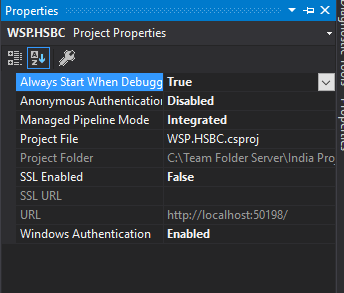
HttpContext.Current.User.Identity.Name returns null or empty string

This error come due to authentication mode problem.

To correct this  error follow the following step:
  1. Select your project.
  2. press F4.
  3. the screen will open like the below image.
  4. disable the "Anonymous Authentication" and enable the "Window Authentication".


paste in the web configuration

<system.web>
    <authentication mode="Windows">
</system.web>

Wednesday, 3 July 2019

All tables name like

ome time we need to get all the tables which start with any character.We have imported data form excel sheet to MS SQL database. Now want to get list of table and delete the imported data table from database.

This query will helpful to get the table from database

SELECT TABLE_NAME FROM INFORMATION_SCHEMA.TABLES

WHERE TABLE_TYPE = 'BASE TABLE' AND TABLE_NAME LIKE '%$%'

Drop all db objects

Some time we need to restore the database with the help of MS SQL server generate script.
We need to flow these Steps

  1. Generate Database Scripts(Schema and data)
  2. Drop all db objects
  3. Restore Generated script   
Drop all db objects


This below script user can use to drop all database objects from database and
  1. Store procedures
  2. Views
  3. Functions
  4. Tables
DB Utility script

/* Drop all non-system stored procs */
DECLARE @name VARCHAR(128)
DECLARE @SQL VARCHAR(254)
SELECT @name = (SELECT TOP 1 [name] FROM sysobjects WHERE [type] = 'P' AND category = 0 ORDER BY [name])
WHILE @name is not null
BEGIN
    SELECT @SQL = 'DROP PROCEDURE [dbo].[' + RTRIM(@name) +']'
    EXEC (@SQL)
    PRINT 'Dropped Procedure: ' + @name
    SELECT @name = (SELECT TOP 1 [name] FROM sysobjects WHERE [type] = 'P' AND category = 0 AND [name] > @name ORDER BY [name])
END
GO
/* Drop all views */
DECLARE @name VARCHAR(128)
DECLARE @SQL VARCHAR(254)
SELECT @name = (SELECT TOP 1 [name] FROM sysobjects WHERE [type] = 'V' AND category = 0 ORDER BY [name])
WHILE @name IS NOT NULL
BEGIN
    SELECT @SQL = 'DROP VIEW [dbo].[' + RTRIM(@name) +']'
    EXEC (@SQL)
    PRINT 'Dropped View: ' + @name
    SELECT @name = (SELECT TOP 1 [name] FROM sysobjects WHERE [type] = 'V' AND category = 0 AND [name] > @name ORDER BY [name])
END
GO
/* Drop all functions */
DECLARE @name VARCHAR(128)
DECLARE @SQL VARCHAR(254)
SELECT @name = (SELECT TOP 1 [name] FROM sysobjects WHERE [type] IN (N'FN', N'IF', N'TF', N'FS', N'FT') AND category = 0 ORDER BY [name])
WHILE @name IS NOT NULL
BEGIN
    SELECT @SQL = 'DROP FUNCTION [dbo].[' + RTRIM(@name) +']'
    EXEC (@SQL)
    PRINT 'Dropped Function: ' + @name
    SELECT @name = (SELECT TOP 1 [name] FROM sysobjects WHERE [type] IN (N'FN', N'IF', N'TF', N'FS', N'FT') AND category = 0 AND [name] > @name ORDER BY [name])
END
GO
/* Drop all Foreign Key constraints */
DECLARE @name VARCHAR(128)
DECLARE @constraint VARCHAR(254)
DECLARE @SQL VARCHAR(254)
SELECT @name = (SELECT TOP 1 TABLE_NAME FROM INFORMATION_SCHEMA.TABLE_CONSTRAINTS WHERE constraint_catalog=DB_NAME() AND CONSTRAINT_TYPE = 'FOREIGN KEY' ORDER BY TABLE_NAME)
WHILE @name is not null
BEGIN
    SELECT @constraint = (SELECT TOP 1 CONSTRAINT_NAME FROM INFORMATION_SCHEMA.TABLE_CONSTRAINTS WHERE constraint_catalog=DB_NAME() AND CONSTRAINT_TYPE = 'FOREIGN KEY' AND TABLE_NAME = @name ORDER BY CONSTRAINT_NAME)
    WHILE @constraint IS NOT NULL
    BEGIN
        SELECT @SQL = 'ALTER TABLE [dbo].[' + RTRIM(@name) +'] DROP CONSTRAINT [' + RTRIM(@constraint) +']'
        EXEC (@SQL)
        PRINT 'Dropped FK Constraint: ' + @constraint + ' on ' + @name
        SELECT @constraint = (SELECT TOP 1 CONSTRAINT_NAME FROM INFORMATION_SCHEMA.TABLE_CONSTRAINTS WHERE constraint_catalog=DB_NAME() AND CONSTRAINT_TYPE = 'FOREIGN KEY' AND CONSTRAINT_NAME <> @constraint AND TABLE_NAME = @name ORDER BY CONSTRAINT_NAME)
    END
SELECT @name = (SELECT TOP 1 TABLE_NAME FROM INFORMATION_SCHEMA.TABLE_CONSTRAINTS WHERE constraint_catalog=DB_NAME() AND CONSTRAINT_TYPE = 'FOREIGN KEY' ORDER BY TABLE_NAME)
END
GO
/* Drop all Primary Key constraints */
DECLARE @name VARCHAR(128)
DECLARE @constraint VARCHAR(254)
DECLARE @SQL VARCHAR(254)
SELECT @name = (SELECT TOP 1 TABLE_NAME FROM INFORMATION_SCHEMA.TABLE_CONSTRAINTS WHERE constraint_catalog=DB_NAME() AND CONSTRAINT_TYPE = 'PRIMARY KEY' ORDER BY TABLE_NAME)
WHILE @name IS NOT NULL
BEGIN
    SELECT @constraint = (SELECT TOP 1 CONSTRAINT_NAME FROM INFORMATION_SCHEMA.TABLE_CONSTRAINTS WHERE constraint_catalog=DB_NAME() AND CONSTRAINT_TYPE = 'PRIMARY KEY' AND TABLE_NAME = @name ORDER BY CONSTRAINT_NAME)
    WHILE @constraint is not null
    BEGIN
        SELECT @SQL = 'ALTER TABLE [dbo].[' + RTRIM(@name) +'] DROP CONSTRAINT [' + RTRIM(@constraint)+']'
        EXEC (@SQL)
        PRINT 'Dropped PK Constraint: ' + @constraint + ' on ' + @name
        SELECT @constraint = (SELECT TOP 1 CONSTRAINT_NAME FROM INFORMATION_SCHEMA.TABLE_CONSTRAINTS WHERE constraint_catalog=DB_NAME() AND CONSTRAINT_TYPE = 'PRIMARY KEY' AND CONSTRAINT_NAME <> @constraint AND TABLE_NAME = @name ORDER BY CONSTRAINT_NAME)
    END
SELECT @name = (SELECT TOP 1 TABLE_NAME FROM INFORMATION_SCHEMA.TABLE_CONSTRAINTS WHERE constraint_catalog=DB_NAME() AND CONSTRAINT_TYPE = 'PRIMARY KEY' ORDER BY TABLE_NAME)
END
GO
/* Drop all tables */
DECLARE @name VARCHAR(128)
DECLARE @SQL VARCHAR(254)
SELECT @name = (SELECT TOP 1 [name] FROM sysobjects WHERE [type] = 'U' AND category = 0 ORDER BY [name])
WHILE @name IS NOT NULL
BEGIN
    SELECT @SQL = 'DROP TABLE [dbo].[' + RTRIM(@name) +']'
    EXEC (@SQL)
    PRINT 'Dropped Table: ' + @name
    SELECT @name = (SELECT TOP 1 [name] FROM sysobjects WHERE [type] = 'U' AND category = 0 AND [name] > @name ORDER BY [name])
END
GO

Monday, 27 May 2019

Get days, months, and years between dates in SQL

Example:-


Select Command:-

SELECT * FROM dbo.GetDateDifferenceInYearsMonthsDays('2019-04-27 10:24:55.387',GETDATE())

Create SQL Function:-

CREATE FUNCTION [dbo].[GetDateDifferenceInYearsMonthsDays]
(
    @FromDate DATETIME, @ToDate DATETIME
)
RETURNS
 @DateDifference TABLE (
 YEAR INT,  MONTH INT, DAYS INT)
AS
BEGIN
    DECLARE @Years INT, @Months INT, @Days INT, @tmpFromDate DATETIME
    SET @Years = DATEDIFF(YEAR, @FromDate, @ToDate)
     - (CASE WHEN DATEADD(YEAR, DATEDIFF(YEAR, @FromDate, @ToDate),
              @FromDate) > @ToDate THEN 1 ELSE 0 END)
   
    SET @tmpFromDate = DATEADD(YEAR, @Years , @FromDate)
    SET @Months =  DATEDIFF(MONTH, @tmpFromDate, @ToDate)
     - (CASE WHEN DATEADD(MONTH,DATEDIFF(MONTH, @tmpFromDate, @ToDate),
              @tmpFromDate) > @ToDate THEN 1 ELSE 0 END)
   
    SET @tmpFromDate = DATEADD(MONTH, @Months , @tmpFromDate)
    SET @Days =  DATEDIFF(DAY, @tmpFromDate, @ToDate)
     - (CASE WHEN DATEADD(DAY, DATEDIFF(DAY, @tmpFromDate, @ToDate),
              @tmpFromDate) > @ToDate THEN 1 ELSE 0 END)
   
    INSERT INTO @DateDifference
    VALUES(@Years, @Months, @Days)
   
    RETURN
END

Thursday, 23 May 2019

Find and Remove Duplicate Rows in a Table using SQL Server

Syntax:-

--//synatx to find duplicate and count the no of rows
;WITH CTE AS
(
    SELECT ColomnName, ROW_NUMBER() OVER
    (
        PARTITION BY ColomnName ORDER BY ID
    ) RowNumber
    FROM  TableName
)

--// to check duplicate record select command
SELECT *   FROM CTE WHERE RowNumber > 1

--//Delete duplicate  record
DELETE FROM CTE WHERE RowNumber > 1


Example:-

i have the table that contain the duplicate sector

Syntax to select the duplicate record:-

;WITH CTE AS
(
    SELECT name, ROW_NUMBER() OVER
    (
        PARTITION BY name ORDER BY id
    ) RowNumber
    FROM  dbo.Sectors
)


SELECT *   FROM CTE WHERE RowNumber > 1


Syntax to delete the duplicate Data:-

;WITH CTE AS
(
    SELECT name, ROW_NUMBER() OVER
    (
        PARTITION BY name ORDER BY id
    ) RowNumber
    FROM  dbo.Sectors
)
DELETE  FROM CTE WHERE RowNumber > 1


Monday, 20 May 2019

Convert multiple rows into one with comma as separator

Introduction:-

in this article we will learn how to convert multiple row into one comma separator.

Example:-


I have table that contain the skill data . now convert it comma separated form.


Synatx:-

1. 
Declare @tmp varchar(250)

SET @tmp = ''
select @tmp = @tmp + ColomnName + ', ' from TableName
select SUBSTRING(@tmp, 0, LEN(@tmp))


2.
select
stuff((
SELECT ',' + ColomnName 
FROM     TableName
for xml path('')
1.      ),1,1,'') as name_csv


What is Agile,advantage and disadvantages

Introduction:- It is a software development life cycle used for software development, that is characterized by the division of tasks in...